
Twelve hours of footage, five cameras, and two minutes on which the case turns.
Two body-worn recordings, in-car video, shop CCTV and a bystander’s phone may all cover the same incident. At least initially, we can’t trust that we have something as basic as a dependable time reference that is shared between the cameras. Without synchronisation, the reviewer finds the incident five times, watches five windows separately and reconstructs sequence from memory.
VST Teams puts the recordings on one timeline, with transcriptions, so that in the player, you can click a line in the transcript and immediately see the views from all cameras at that moment.
Synchronise the evidence, not the camera fleet
Fleet synchronisation solves the easy case: devices from one managed system. Case material is mixed: force-issued bodycams and car cameras, exported CCTV and public video, each with its own clock, frame timing and encoding — and you might not have access to the original player (e.g. Axon).
Where recordings captured common sound, VST aligns them automatically from the audio itself using ambient sound at the scene (you don’t need something dramatic like a gunshot). Because the alignment uses shared audio rather than a vendor clock, it is not tied to a camera fleet and may resolve relative timing below a video frame (10 to 20 milliseconds is common). Where audio is absent or unusable, the reviewer can align a visible event manually.
The distinction matters: metadata records a claimed time; synchronisation estimates how the recordings relate to one another. Both should remain visible in the audit trail.
Search once
Once the sources share a timeline, synchronised playback is only the first gain.
Each recording is transcribed against the same timebase. Search for a phrase and VST opens every source at that point. The reviewer can follow the clearest angle without losing sequence, while each transcript segment remains attributable to its recording.
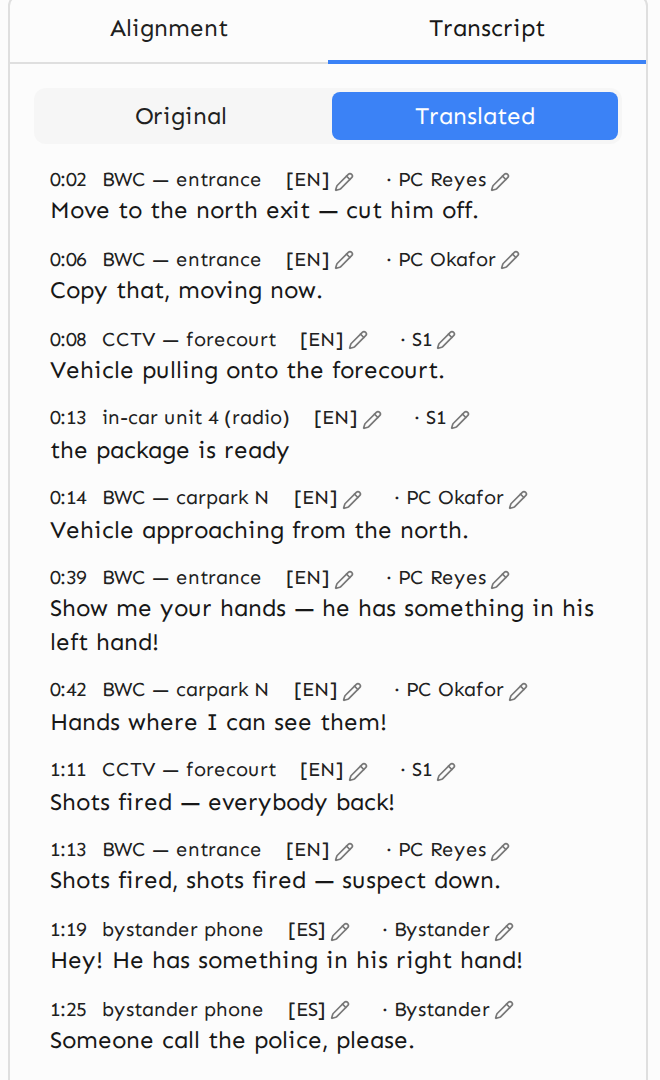
A working translation sits beside the original transcript. It is enough to identify relevant passages and decide what merits formal translation. Evidential translation remains a separate, accountable step under the applicable procedure.
The unit of review goes from five files watched separately to a single incident seen simultaneously from five vantage points. The bodycam review tour shows the workflow.
The milliseconds left over
Audio synchronisation does not make two recordings identical. Microphones occupy different positions; devices introduce different processing delays; sound arrives through noise and reverberation; recording clocks may drift.
The “synchronisation gap” after we automatically align the videos on the soundtracks can contain useful information. After other factors are accounted for, an event may still reach one microphone slightly before another. With sound travelling at roughly 343 metres per second, an 11-millisecond difference indicates a distance of about 3.8 metres of “acoustic path length”. Simply put, with common audio, approximate relative positions of the recording devices can sometimes be determined.
To be clear, VST does not expose a positioning feature or readout from this, and none is currently planned: we simply mention this “synchronisation gap” as an interesting artefact not readily apparent in a conventional clock-based playback.
What the system should preserve
A good multi-camera workflow keeps distinct:
- original metadata and frame timing;
- estimated alignment, drift and confidence;
- any manual correction and the event used;
- transcript and working translation, attributed to source;
- the reviewer’s changes.
That matters to both prosecution and defence. The most useful output is not a composite video of unknown construction, but a reproducible timeline that either side can inspect. This is why the same tooling belongs on the defence side of the case as well as the prosecution’s.
If your team routinely works with multi-video incidents, we would be glad to show you how VST Teams handles them.